No container, no weights, no memory limit to worry about. The only thing I own in this model is a prompt and it did not always go well.
Introduction
Two models in this pipeline have already had their own article: card-detect lambda, which answers is this even an AWS Builder Card?, and image-processor lambda, which answers where exactly is the card in this photo? Whole pipeline in a nutshell is also described here.
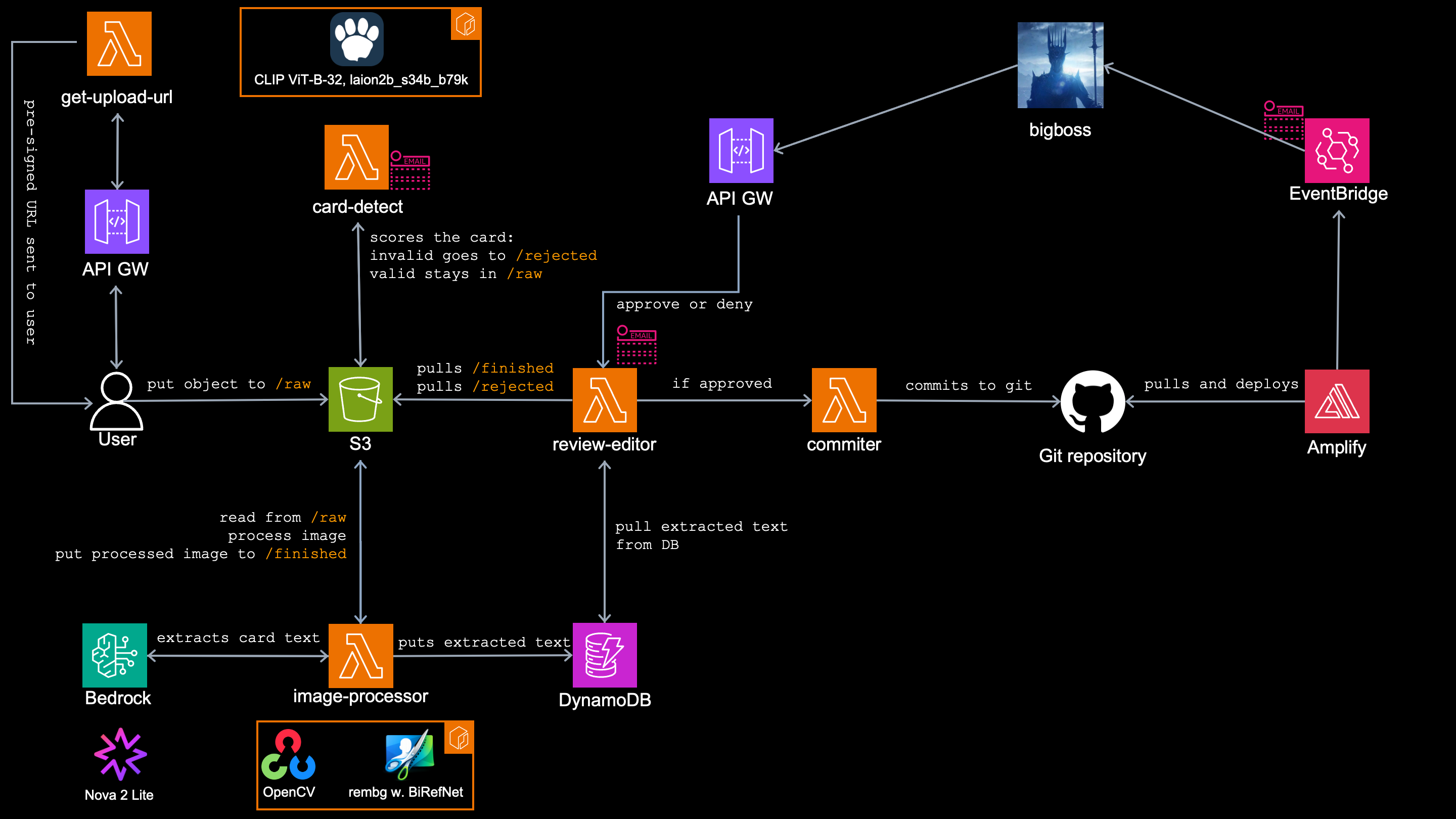
So what is the current situation?
The card is straight and clean by now, but I still don’t know what it says.
This article describes what happens next. There is another model which is not part of any lambda, but is being called by image-processor. That model is Nova 2 Lite living in Amazon Bedrock and it extracts the card’s text. Once extracted, the same lambda write that extracted text to DynamoDB as a card’s metadata.
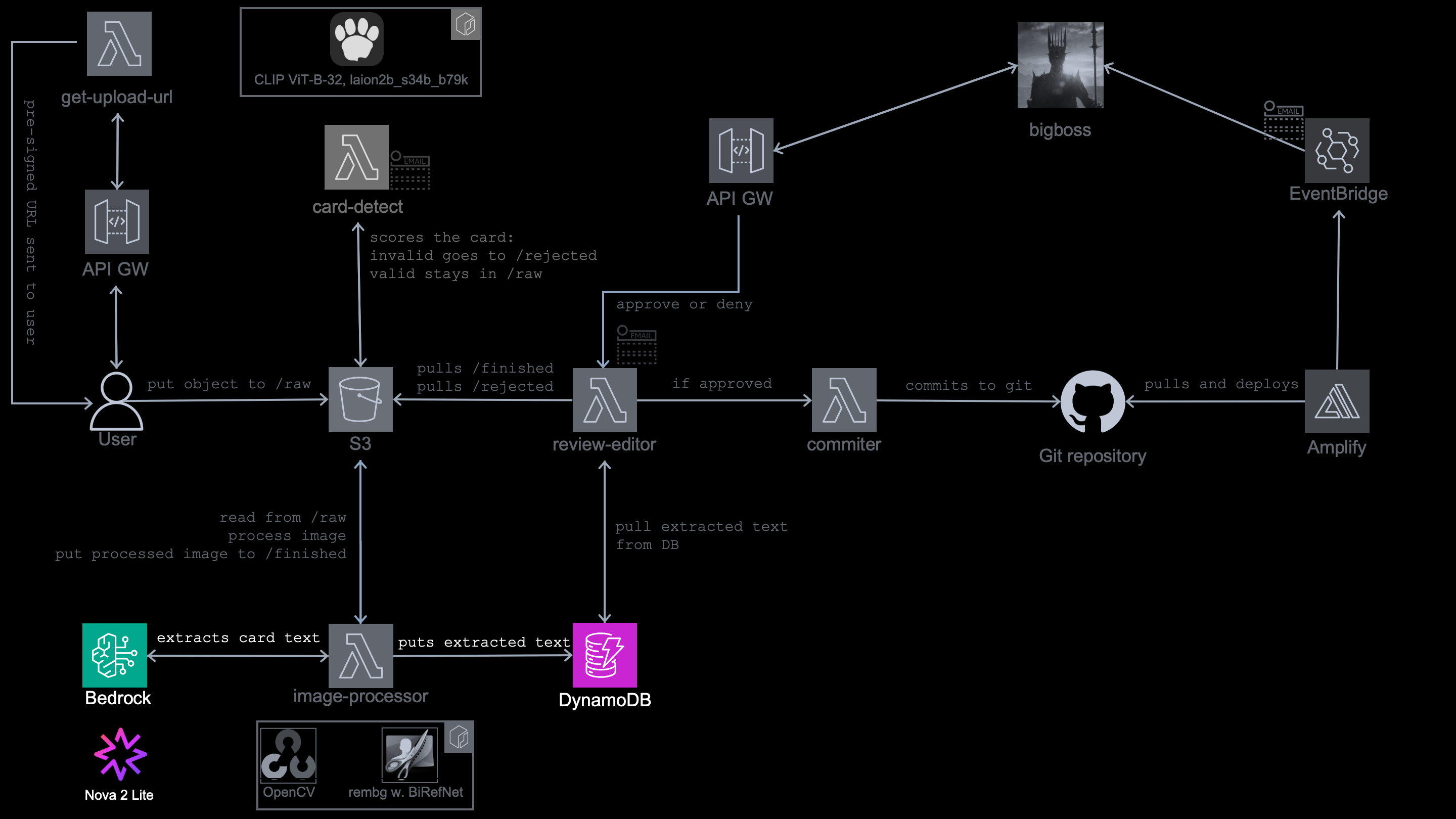
The model in Berdock
Both previous articles run the same three questions before putting a model into a lambda. Since this model does not run in the lambda, I don’t even care about the answers:
-
How much CPU and memory does it need? – I don’t care now, it lives in the
Bedrock. - Where do the weights come from? – Nowhere.
- What runs at inference? – A simple HTTPS call.
No container to build, nothing to bake into an image, no ECR push, no cold start to measure, no 10240 MB ceiling to hit.
The model is Amazon Nova 2 Lite and it doesn’t even run in my account.
The lambda make an API call towards Bedrock, where the text is extracted and later stored in DynamoDB as a card’s metadata. The only thing I have to worry about here is IAM permissions and writing a good prompt.
Why model in the first place?
Reading a card is not just OCR! Here is the actual problem and it is not just the text recognition:
- The title is text
- The description is text.
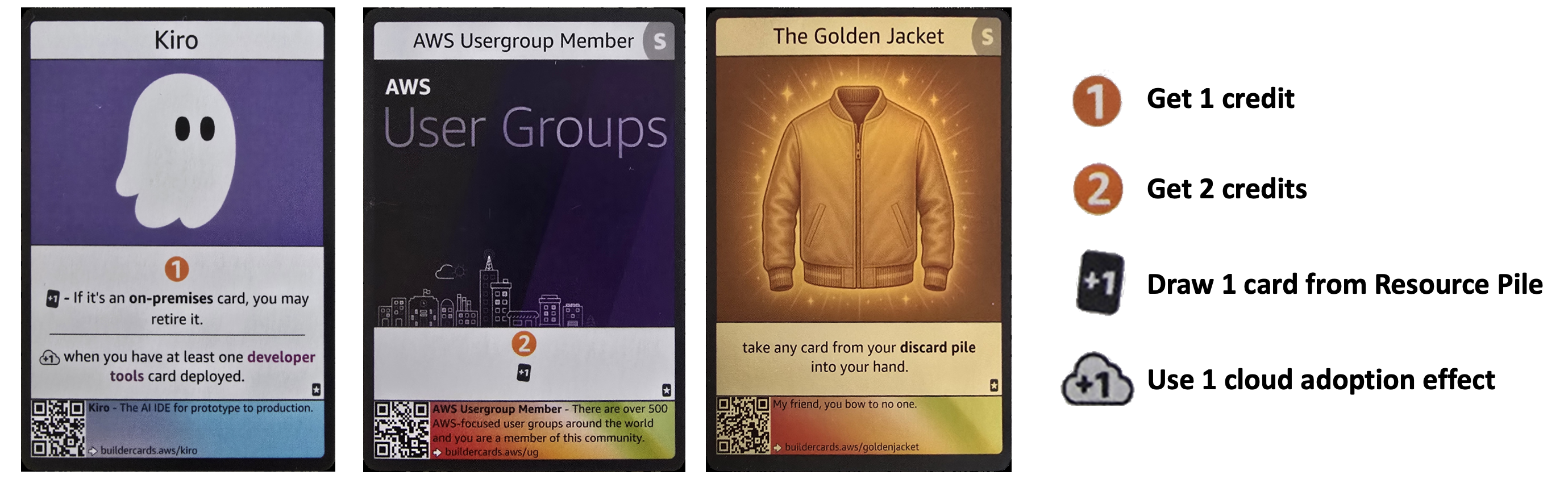
- The effects are not text, they’re icons.
A player knows what an orange circle means, but model has to be told.
Some cards carry all 3 icons, others just 1 or 2 and there are cards with none.
AWS offer couple of resources capable of recognizing the text:
Amazon TextractAmazon Reckognition
But their inability to understand and interpret the icons made them unusable for this case. This is the only reason I used multimodal model, capable of both tasks.
Calling the model
The whole thing is just a converse() API call:
def extract_card_fields(png_bytes):
    # ... (docstring trimmed) ...

    # Invoke the Bedrock vision model.
    resp = bedrock.converse(
        modelId=BEDROCK_MODEL_ID,
        system=[{"text": EXTRACT_SYSTEM}],
        messages=[{
            "role": "user",
            "content": [
                {"text": EXTRACT_PROMPT},
                {"image": {"format": "png", "source": {"bytes": png_bytes}}},
            ],
        }],
        inferenceConfig={"maxTokens": 1200, "temperature": 0.0},
    )

    # Parse the model response.
    text = resp["output"]["message"]["content"][0]["text"]
    return _parse_json(text)
Enter fullscreen mode Exit fullscreen mode
I set up temperature to 0.0 because I want it to always return answer it is most confident about. I am expecting always the same answer, no matter how many times the same card goes in. That actually makes sense, since it is reading the text.
The (almost) perfect prompt
In order for the model to do anything, it needs its instructions – the prompt. Especially in case of the icons.
# ...(beginning and title omitted)...

TASK 2: EFFECT
The effect is the gameplay area in the middle of the card.

The effect area may contain small icons.
Not all icon types are always present on s csrd.
A card may have: 0 icons, or 1 icon, or 2 icons or all 3 icons.
Only use icons that are actually visible on this card.

There are exactly 3 possible icon types:

ICON TYPE 1: CREDIT
Visual appearance: orange circle contains a white number. That number has NO plus sign.
Example: orange circle with "1"
This icon can be small, so look carefully.
Meaning: "Get N credit", if N = 1.

ICON TYPE 2: DRAW CARDS
Visual appearance: black rounded rectangle contains a white number. the number ALWAYS has a plus sign, like "+1" or "+2"
This icon can be small, so look carefully.
Meaning: "Draw N card from your Resources Pile" if N = 1. "Draw N cards from your Resources Pile" if N > 1.

ICON TYPE 3: CLOUD ADOPTION EFFECT
Visual appearance: small white cloud shape with black outline contains a black number. the number ALWAYS has a plus sign, like "+1" or "+2".
This icon can be small, so look carefully.
Meaning: "Use N cloud adoption effect" if N = 1. "Use N cloud adoption effects" if N > 1.

# ...(rest of the prompt omitted)...
Enter fullscreen mode Exit fullscreen mode
During the local and live testing, I came into several issues but all I was able to fix with tuning the prompt.
Fabricating the effect icons
The effects were where prompt was loosing to most. Sometimes it was ignoring the icons, other time it was adding them where they weren’t, like for this card:
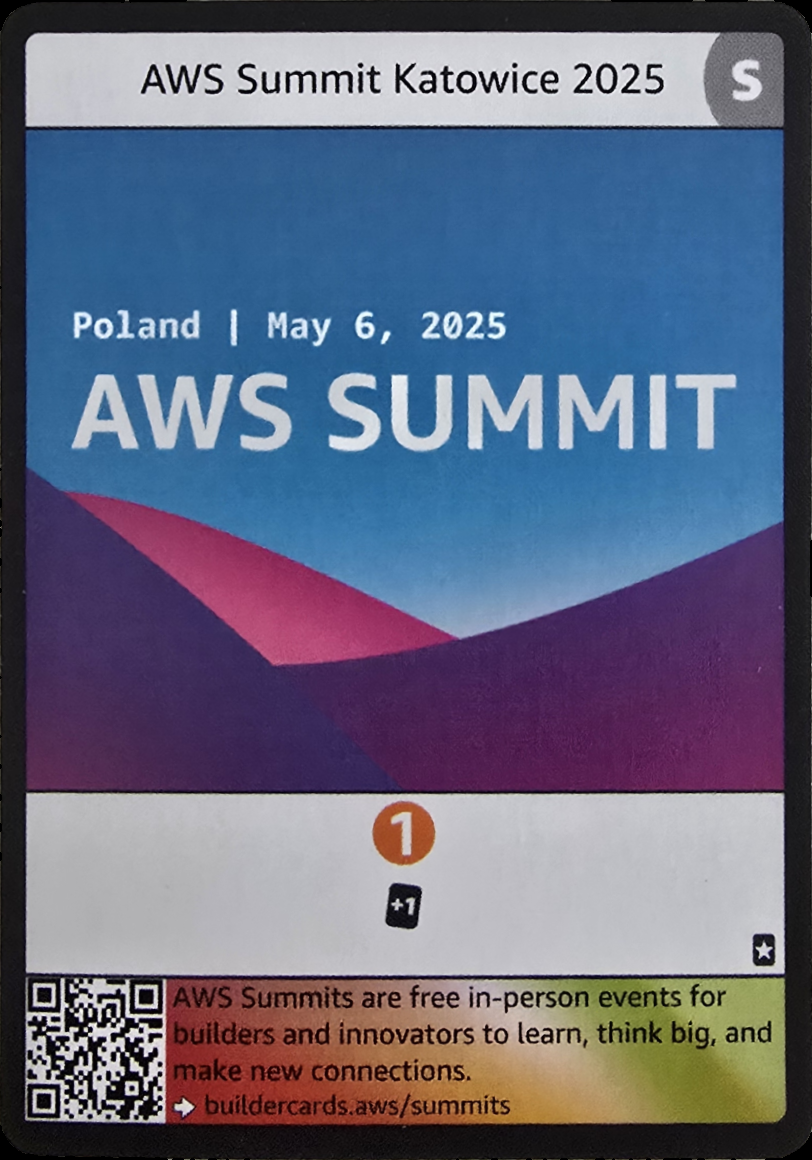
I ran it 11 times and 7 times I got it wrong:
Get 1 credit. . —-> THIS IS NOT ON THE CARD!
Draw 1 card from your Resources Pile.
Use 1 cloud adoption effect
The card has no cloud adoption effect, but yet it was fabricating it!
The solution is easier than you think. After I added section IMPORTANT ICON RULES into the prompt, the icon hallucination stopped.
IMPORTANT ICON RULES:
If a number has NO plus sign and is inside an orange circle, it means credits.
If a number has a plus sign and is inside a dark rounded rectangle, it means draw cards.
If a number has a plus sign and is inside a white cloud outline, it means cloud adoption effects.
A plus sign never means credits.
Do not invent missing icons.
Do not mention credits unless an orange circle is visible.
Do not mention drawing cards unless a dark rounded rectangle is visible.
Do not mention cloud adoption effects unless a white cloud icon is visible.
Enter fullscreen mode Exit fullscreen mode
Ignoring the number in Credits
Another problem I had was with Credits (a number in orange circle).
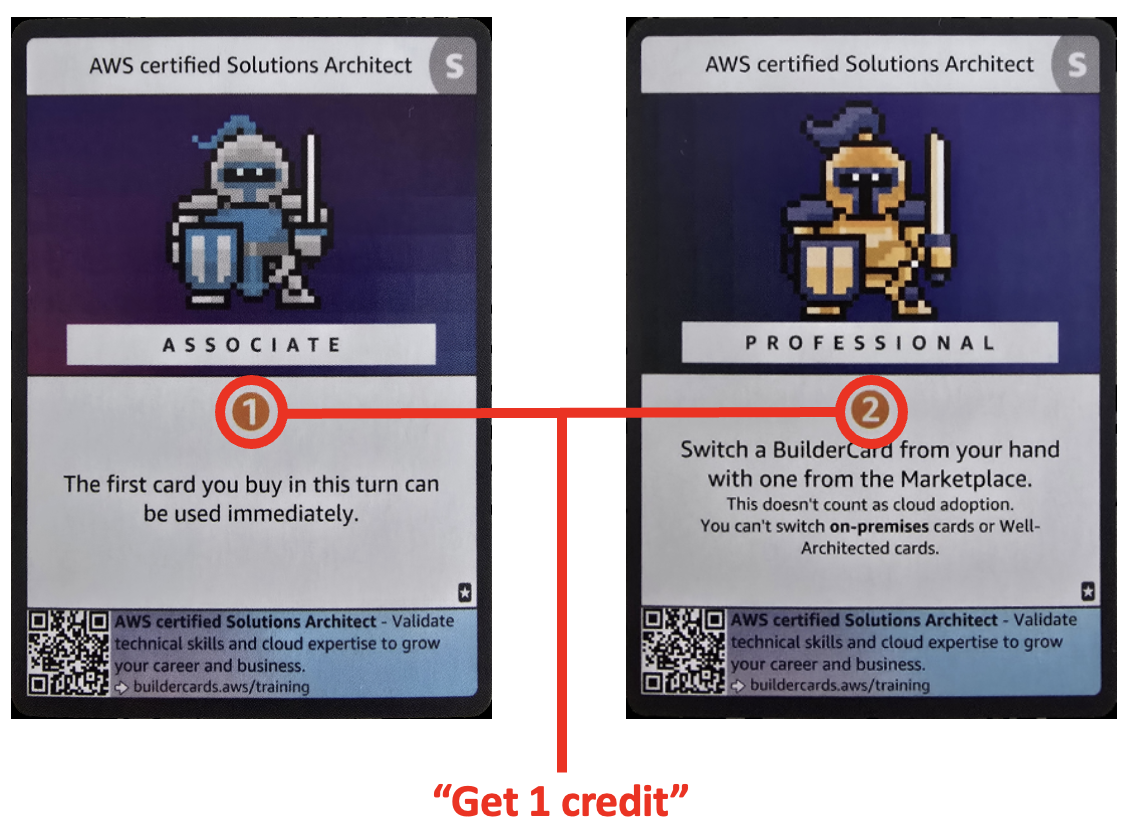
With initial prompt, it was only interpreting it as: Get 1 credit, no matter the number in the circle.
The solution was making the prompt into few-shot example prompt, adding examples like:
"Get N credit", if N = 1.

"Draw N card from your Resources Pile" if N = 1. "Draw N cards from your Resources Pile" if N > 1.

"Use N cloud adoption effect" if N = 1. "Use N cloud adoption effects" if N > 1
Enter fullscreen mode Exit fullscreen mode
The subtitle in some cards
I am expecting a model to read the text on the card, and return 3 key:value pairs:
- Title
- Effect
- Description
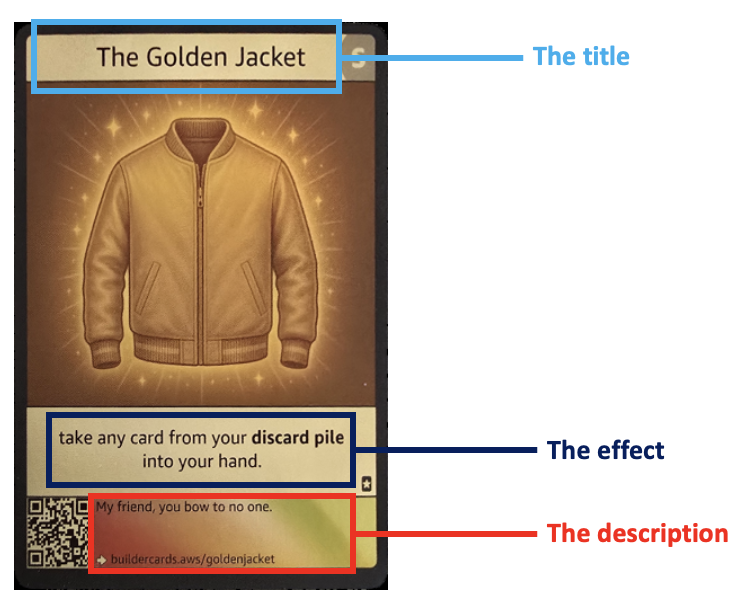
But here’s where AWS Builder Cards fights back again – some of them have a “subtitle”:
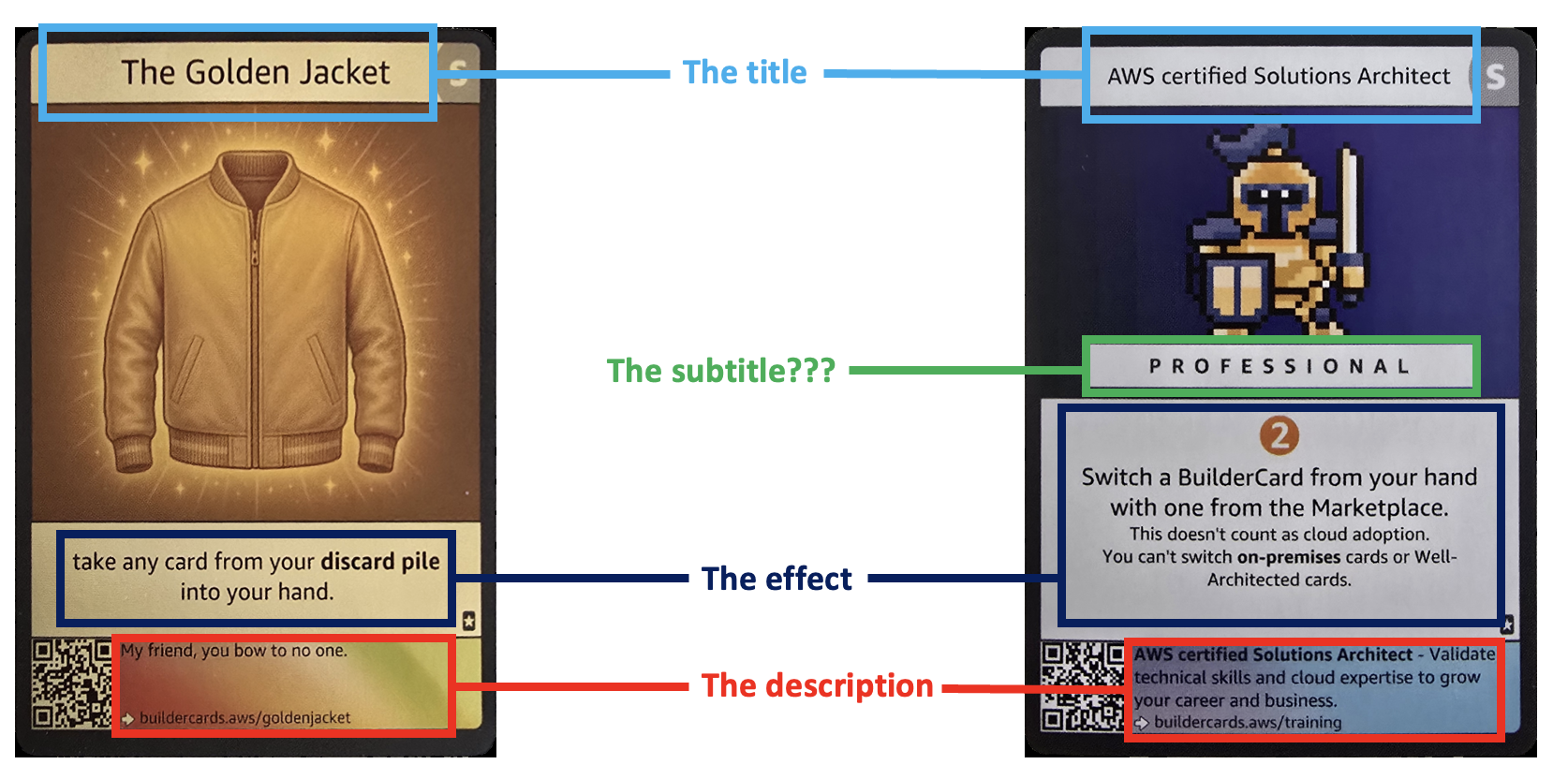
Without considering that into the prompt, this was the result of the text extraction:
AWS certified Solutions Architect
AWS certified Solutions Architect Associate
AWS certified Solutions Architect
AWS certified Solutions Architect Professional
AWS certified Developer
AWS certified Developer Associate
AWS certified Sysops Administrator
AWS certified Sysops Administrator Associate
Look at the first two rows. Those are two physically different cards – a Solutions Architect Associate and a Solutions Architect Professional, but the model returned the same title for both. If I had trusted the drafts (without manual approvals), my catalog would hold the same card twice and be missing another one.
I had 2 options how to deal with that:
- Keep it as is, and fix it during the human in the loop manual approval
- Fix the prompt
Of course I fixed the prompt – the less manual job for me during the approvals, the better!
EXTRACT_PROMPT = """Return ONLY valid JSON.

The JSON must have exactly these keys:

{
"title": "",
"effect": "",
"description": ""
}

Read the card from top to bottom.

TASK 1: TITLE
The title is the card name. It can have two parts.

Part 1 - the text in the title bar at the top of the card.
Always present.
Read it in full, exactly as printed.

Part 2 - a qualifier printed in its own banner inside the artwork, below the title bar.
Only some cards have this. Examples of what it looks like: ASSOCIATE, PROFESSIONAL, FOUNDATIONAL, SPECIALTY.

If a banner like that is visible, the title is Part 1 followed by Part 2, written in normal capitalisation:
"AWS certified Solutions Architect" + "ASSOCIATE" -> "AWS certified Solutions Architect Associate"

If no such banner is visible, the title is Part 1 alone.
Do not add a qualifier that is not printed on the card.

Examples: "AWS Cloud Practitioner", "David", "AWS certified Solutions Architect Professional".
If you cannot read it, use "".

# ...(rest of the prompt omitted)...
Enter fullscreen mode Exit fullscreen mode
That’s just enough for model to understand when the card has a “subtitle”.
Formatting issues
That may seem like not important, but consider text on the the cards contain bold text, links, sepparate lines, etc… If I want final card page to look like the card itself, I have to follow that.
Again, this is something that would take me 10 seconds during the manual approval, but why if I can do it with prompt? Few shots example will do the job
If you spot text in bold, write it as for makrdown files - that means like this: **this is bold text**

Any internet link (URL) you spot, you must write in this format: [link](link).
Enter fullscreen mode Exit fullscreen mode
Having implemented all prompt modifications, now I can say in most cases, this prompt works 100%. Occasionally there some some minimal hickups, but generally it works perfectly.
As you can imagine, I did not write this prompt at once. At least 6 versions of it went live, after I was happy with the outputs.
Card’s metadata goes in DynamoDB
Bedrock returns title, description and effect back to image-processing lambda.
To create a card’s slug markdown file which is performed by lambda review-editor in the next steps.
Therefore the image-processor lambda actually gathers a lot more values, before sending them to DynamoDB.
def write_card_item(card_id, event, year, raw_key, fin_key, fields, uploader=""):
    # Generate a timestamp for the new record
    now = datetime.now(timezone.utc).isoformat()

    # The year is only appended when the title does not already carry it
    title_draft = fields.get("title", "")
    year_str = str(year).strip()
    slug_src = f"{title_draft} {year_str}" if year_str and year_str not in title_draft else title_draft
    slug_draft = slugify(slug_src)

    # Store the pending card record in DynamoDB
    ddb.put_item(
        TableName=DDB_TABLE,
        Item={
            "cardId": {"S": card_id},                                        # ---> from S3 key (the uuid, via parse_meta)
            "slug": {"S": ""},                                               # ---> empty, for the human
            "slug_ai_draft": {"S": slug_draft},                              # ---> computed locally from Bedrock's title + year
            "weight": {"S": ""},                                             # ---> empty, for the human
            "event": {"S": event or ""},                                     # ---> from S3 key (via parse_meta)
            "year": {"S": str(year or "")},                                  # ---> from S3 key (via parse_meta)
            "uploader": {"S": uploader or ""},                               # ---> from S3 object metadata (typed by the visitor)
            "category": {"S": "collectibles"},                               # ---> hardcoded constant
            "subcategory": {"S": ""},                                        # ---> empty, for the human
            "title": {"S": ""},                                              # ---> empty, for the human
            "title_ai_draft": {"S": fields.get("title", "")},                # ---> from Bedrock
            "effect": {"S": ""},                                             # ---> empty, for the human
            "effect_ai_draft": {"S": fields.get("effect", "")},              # ---> from Bedrock
            "description": {"S": ""},                                        # ---> empty, for the human
            "description_ai_draft": {"S": fields.get("description", "")},    # ---> from Bedrock
            "rawKey": {"S": raw_key},                                        # ---> from the S3 event (the uploaded object's key)
            "finishedKey": {"S": fin_key},                                   # ---> computed locally (images/finished/<cardId>.png)
            "status": {"S": "pending"},                                      # ---> hardcoded constant - the review gate
            "createdAt": {"S": now},                                         # ---> computed locally (UTC timestamp)
            "updatedAt": {"S": now},                                         # ---> computed locally (same timestamp)
        },
    )
Enter fullscreen mode Exit fullscreen mode
This is what is actually written in the DB. Some values are intentionally left empty and will be filled by next lambda – review-editor, while some of the empties have to be manually filled by me during manual approval.
Why not separate lambda?
It is tempting to create a separate lambda function for Bedrock and DynamoDB calls, which would be completly isolated from image-processing lambda.
However, I found that as not a good idea, mainly because how the image-processor work and what it sends to the Bedrock. Lambda does not send the finished card picture, from images/finished to the text extraction. It sends the png bytes, it stores in its own memory. The split would mean a second function has to download the finished image from S3, which brings extra latency, another GET, IAM role, etc…
The one argument that would justify splitting, is wide IAM permission current current image-processor holds. Having image processing part along with API calls to Bedrock and Dynamo DB requires permissions for S3, Bedrock, DynamoDB and sns in one role. That doesn’t go really well with lest privilege concept I am applying where possible in this project, but here I made an exception.
Each of the arguments have pros and cons and me personally I was 50:50 on it if to split or keep as one, but I decided to keep it this time.
Conclusion
This part of the pipeline is pretty simple, the longest part to test and tune was the prompt. I started on couple of lines, and after endless tests I ended up on almost 100 lines.
The result is extracted text written in DynamoDB as particular cards’ metadata.
Next step is just manual – me as an admin visually verify the card against the extracted text and approve. Right after that the deployment process starts, which which I described in this article.
Project repo and the remaining articles
From anonymous photo to a published page: An event-driven, AI, image processing pipeline on AWS
Is this even a valid card? Zero-shot image classification model in a lambda container
Where exactly is card in this photo? Image segmentation model inside a maxed-out lambda container